
1️⃣ Where Can I Find the Account Settings?
1️⃣ Go to Global Configurations
2️⃣ Click Account
Or access directly via:
https://v2.officecentral.asia/account/manage

2️⃣ How Do I Change My Username / Email?
⚠️ Important: In OfficeCentral, your email address is your username.
If you change your email, your username will automatically be updated.
Steps to Change Username
1️⃣ Click Change Username / Email
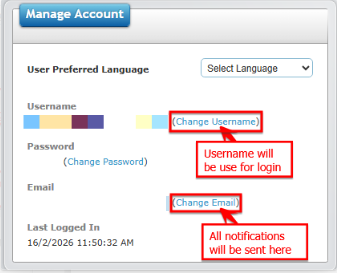 2️⃣ Enter your new username / email address
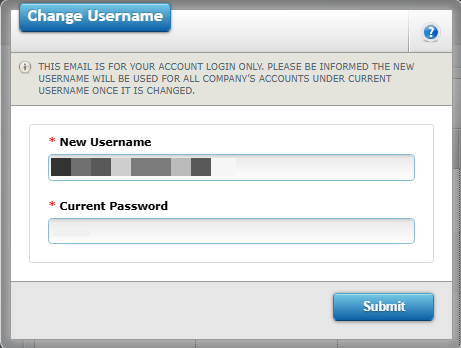
3️⃣ Enter your current (old) password
4️⃣ Click Submit
? Important Reminders
Make sure your new username / email is spelled correctly.
All system notifications (such as General Ledger and Aging reports) will be sent to 'Email'.
Once changed, you must use the new email as your username for future logins.
3️⃣ How Do I Change My Password?
You should change your password if:
You suspect it has been compromised.
You want to improve security.
Steps to Change Password
1️⃣ Click Change Password
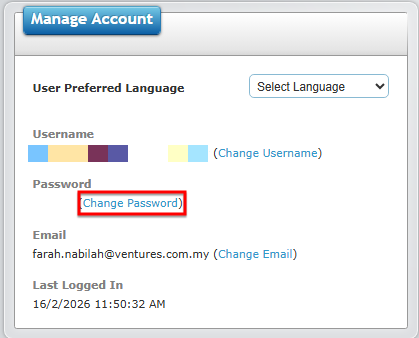
2️⃣ Enter your Old Password
3️⃣ Enter your New Password
4️⃣ Enter the same password again in Confirm New Password
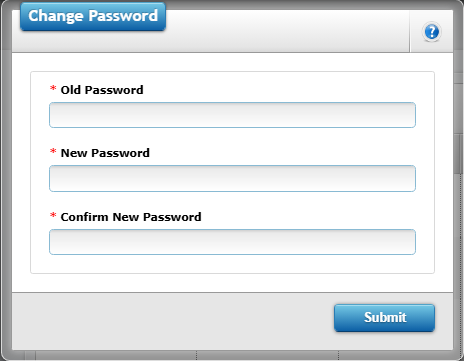
5️⃣ Click Submit
✅ Your password is now updated.
You will need to use the new password the next time you log in.
4️⃣ What If I Have Access to More Than One Company?
If your username is linked to multiple companies:
1️⃣ Go to Login Profile
2️⃣ Select the company profile you want to access
3️⃣ Click the blue link to enter that company
If you experience any issues updating your account information, please contact your system administrator or support team at support@ventures.com.my for assistance.