
? Where to Access Payroll


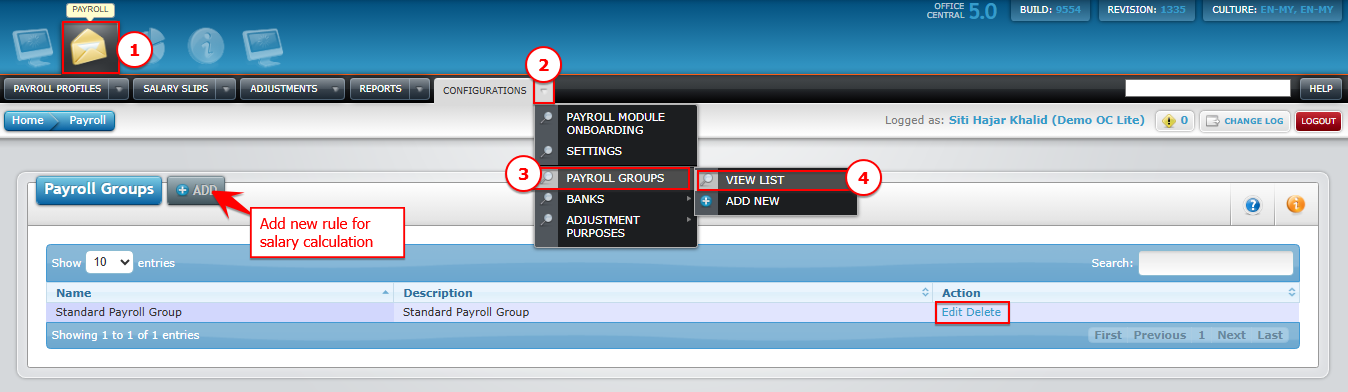
1️⃣ Where to Access This Function
Go to Payroll > Configurations > Payroll Groups > View List
You will see a list of existing payroll group for salary calculation in your company.
| Button | Function |
|---|---|
| Add | Add new rule / payroll group for salary calculation |
| Edit | Modify payroll group |
| Delete | Permanently remove payroll group |
? Example Payroll Group Setup
| Field | Example / Value | Notes |
|---|---|---|
| Payroll Group Name | Standard / Normal | Name of the payroll group |
| Salary Calculation Type (PLEASE REVIEW BELOW TABLE FOR MORE INFORMATION) | Fixed Number of Days per Month | Determines how salary is calculated |
| Total Hours Per Day | 8 | Normal working hours per day |
| No. of Working Days Per Month | 26 | Number of days used for payroll calculation |
| Incomplete Month Salary Calculation | Based on Total Number of Days in Month | Salary for staff joining/resigning mid-month |
| Unpaid Leave Deduction (Monthly Only) | Based on latest salary between cut-off date | Used when salary changes within cut-off |
| Fixed Allowance Contribution Settings | All except Overtime | Statutory contribution coverage for fixed allowances |
| Overtime Contribution Settings | All except EPF | Statutory contribution coverage for overtime |
| OVERTIME | ||
| Overtime Calculation Type | Follow Salary Calculation Type / Fixed 26 Days | Determines OT calculation basis |
| Normal Day (for the first 8 hours of the day) | 1.0 | Regular working Hours |
| Normal Day (after the first 8 hours of the day) | 1.5 | OT rate per hour after 8 hours of normal day |
| Rest Day (for the first 8 hours of the day) | 1.0 | OT rate per hour for the first 8 hours of rest day |
| Rest Day (after the first 8 hours of the day) | 2.0 | OT rate per hour after 8 hours of rest day |
| Public Holiday (for the first 8 hours of the day) | 2.0 | OT rate per hour for the first 8 hours of public day |
| Public Holiday (after the first 8 hours of the day) | 3.0 | OT rate per hour for the first 8 hours of public day |
| Section | Calculation Type | How Salary is Calculated | Example |
|---|---|---|---|
| Salary Calculation Types | Fixed Number of Days per Month | Salary ÷ Fixed Working Days | RM 2,000 ÷ 26 = RM 76.92/day |
| Total Days in Month | Salary ÷ Total Calendar Days | June = 30 days → RM 2,000 ÷ 30 | |
| Total Days Between Cut-Off Dates | Salary ÷ Days Between Cut-Off | 27 Aug–26 Sep = 31 days → RM 2,000 ÷ 31 | |
| 5 Working Days/Week | Salary ÷ Mon–Fri Working Days | August 2025 = 21 days; Cut-off = 23 days | |
| 5.5 Working Days/Week | Salary ÷ Mon–Fri + Half Sat | August 2025 = 23.5 days; Cut-off = 25 days | |
| 6 Working Days/Week | Salary ÷ Mon–Sat | August 2025 = 26 days; Cut-off = 27 days | |
| Location-Based Days | Salary ÷ Location-Specific Days | Kelantan, Sun–Thu = 21 days; Cut-off = 22 days |
⚠ Important Notes
| Field | Notes |
|---|---|
| Payroll Group affects all staff assigned | Incorrect settings impact payroll, overtime & statutory contributions |
| Review before running payroll | Avoid changing calculation type after processing |
| Overtime multipliers | Include before/after hours, rest day & public holiday |
| Incomplete Month Salary | Determines pay for staff joining/resigning mid-month |
| Unpaid Leave Deduction | Only used when monthly salary changes mid-cut-off |