
This guide explains how to manage POS transactions and perform administrative activities through the Back Office.
The Back Office allows users to review transactions, manage sales records, and perform daily POS operations.
Where to Access
POS > Back Office
Available Functions
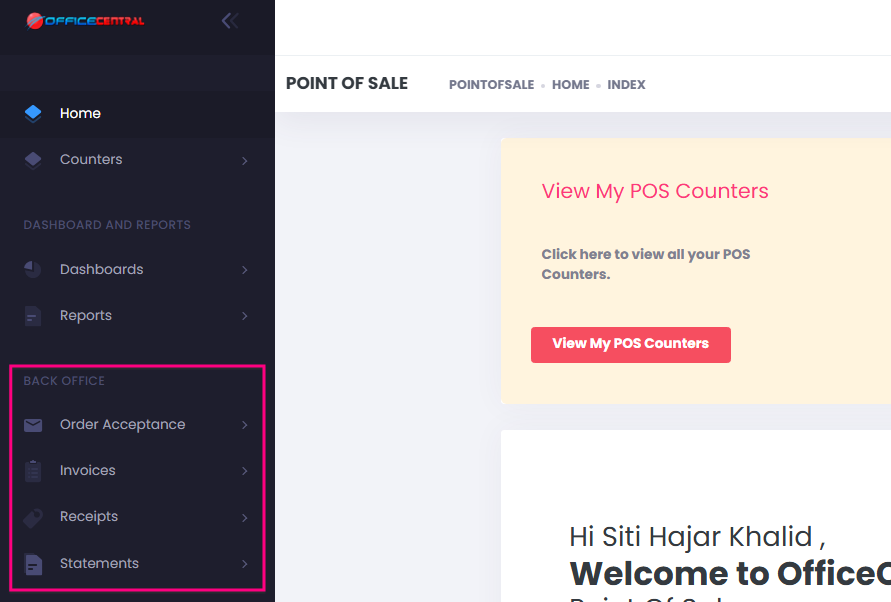
1. Order Acceptance
Users can view saved orders created from the POS screen.
Functions may include:
- Search order
- View order details
- Continue processing order
2. Invoices
Users can view completed sales transactions.
Information displayed may include:
- Invoice number
- Customer details
- Transaction date
- Payment information
- Total amount
3. Receipts
Users can reprint receipts for completed transactions.
Steps:
- Search the invoice.
- Select the transaction.
- Click Print Receipt.
4. Statements
Users can perform counter-related activities such as:
- View counter statement
- Delete counter statement
- Download counter statement
Important Notes
⚠️ Only completed transactions will appear in invoice records.
⚠️ Always verify transaction details before performing any changes.
⚠️ Back Office access may depend on user permission settings.
Summary
Function | Result |
Order Acceptance | Manage saved orders |
Invoices | Review completed transactions |
Receipt | Generate receipt copy |
Statements | Manage POS operation status |